Development of a centralized healthcare database system to manage patients, healthcare providers, appointments, medical records, and notifications | Realcode4you
1. Introduction
This project addresses the development of a centralized healthcare database system to manage patients, healthcare providers, appointments, medical records, and notifications. The goal is to streamline operations, improve data accessibility, and ensure efficient management of healthcare services. A cloud-based electronic health record (EMR) system has the potential to change how paper-based health care system process by allowing healthcare to use information effectively and improving the quality of care to patients (Voset al., 2020). The system stores data such as patient details, demographics, this system provides structured data storage, better coordination between providers and patients, improved tracking of appointments and medical records, and actionable insights through custom SQL queries for reporting and decision-making.
2. Glossary of Terms
Term | Definition |
Patient | An individual receiving care from a healthcare provider. |
Healthcare Provider | A doctor, nurse, or medical specialist offering services to patients. |
Appointment | A scheduled meeting between a patient and a healthcare provider. |
Medical Record | A digital document that contains the diagnosis, prescription, and treatment. |
Notification | A message or alert sent to a patient, typically about appointments or updates. |
Specialty | The area of medical expertise a healthcare provider practices in. |
3. Project Scope
This system is designed to store and manage core healthcare data entities such as patients, healthcare providers, appointments, medical records, and notifications. It provides capabilities for querying data, generating reports, and ensuring consistent and accurate healthcare data management.
3.1 Functional Requirements
3.1.1 The system shall allow the retrieval of patients based on location (e.g., city).
3.1.2 The system shall maintain a record of all appointments and allow appointment counts.
3.1.3 The system shall display all healthcare providers ordered by their specialty.
3.1.4 The system shall track and count notifications sent to each patient.
3.1.5 The system shall join appointment data with corresponding patient and provider details.
3.1.6 The system shall identify providers who authored more than 1 medical record
3.2 Non-functional Requirements
The system must ensure data accuracy and consistency across entities.
The system must support SQL-based querying for analytical reporting.
The system must be scalable to accommodate an increasing number of records.
The system must maintain relational integrity through foreign key constraints.
3.3 Out of Scope Items
The system does not include a user interface or front-end application.
Real-time appointment scheduling or patient-provider interaction modules are not included.
The system does not perform automated medication suggestions or clinical decision support.
4. Assumptions
4.1 Each patient has a unique patient_id and a single address stored as a text field.
4.2 Each provider is assumed to operate independently and can be linked to multiple
appointments or medical records.
4.3 Appointment data is stored with date, time, status, and is always linked to a valid
patient and provider.
4.4 Medication details are part of the medical record and not maintained in a separate
medication master table.
4.5 Notifications are logged as entries in the system but not tracked for content, just
quantity.
Q1) Draw an ERD for the designed database (15 points) All entities (with meaningful names)

1. Admin administrators who manage users and generate reports
Attributes:
admin_id (Primary Key) – Admin ID PK to identify unique admin record
admin_name – Admin Name
email – Admin Emai ID
2. Patient: Holds information about registered patients
Attributes:
patient_id (Primary Key) – Patient ID PK to identify unique patient record
patient_name – Patient Name
email – Patient Email ID
phone – Patient Phone Number
address – Patient Address
3. HealthcareProvider: Doctors or nurses who provide healthcare services
Attributes:
provider_id (Primary Key) - Provider ID PK to identify unique Provider record
healthcare_name – HealthCare Provider Name
specialty – Health Care Provider Speciality
availability – Health Care Provider Availability
4. Appointment Stores appointment details between patients and providers
Attributes:
appointment_id (Primary Key) - Appointment ID PK to identify unique Appointments record
patient_id (Foreign Key) – Patient_id FK taking reference from Patient table
provider_id (Foreign Key) – Provider_id FK taking reference from Provider
appointment_date – Appointment Date
appointment_time – Appointment Time
appointment_status (e.g., scheduled, cancelled, completed) – Appointment Status
5. MedicalRecord: Contains patients' medical histories (weak because it depends on patient)
Attributes:
record_id (Primary Key) - Record ID PK to identify unique Medical record
patient_id (Foreign Key, owner of the weak entity) – Patient_id FK taking reference from Patient table
provider_id (Foreign Key – who created/updated the record) - Provider_id FK taking reference from Provider
diagnosis – Diagnosis of Patient
medication – Medication for Patient
treatment_notes – Any Treatment notes for Patient
last_updated – Last Updated Timestamp of Record
6. Report: Represents reports generated by admins
Attributes:
report_id (Primary Key) – Report_id PK to identify unique Reports record
admin_id (Foreign Key) – Admin_id FK taking reference from Admin table
report_type (e.g., usage, performance) – Type of Report Generated
generated_on (Date) – Date of Report Generation
7. Notification Stores messages sent to patients
Attributes:
notification_id (Primary Key) - Notification_id PK to identify unique notifications
patient_id (Foreign Key) - Patient_id FK taking reference from Patient table
Appointment_id ( Foreign Key) – Appointment_id taking reference from Appointment table
message – Notification Message content
notification_time (Date) – Time of Notification
Entity | Type | Explanation |
Strong Entities | Admin, Patient, HealthcareProvider, Appointment, Report, Notification, UserAccount | These can exist independently |
Weak Entity | MedicalRecord | Depends on Patient for identification and existence |
Each entity is fully normalized to 3NF (no partial or transitive dependencies).
The MedicalRecord is modeled as a weak entity because it depends on the existence of a Patient.
Relationships follow appropriate min–max cardinality for real-world modeling (e.g., a patient can have many appointments).
Foreign keys ensure referential integrity between related entities.
All relationships are enforced through foreign keys, ensuring that data across tables remains valid and synchronized (e.g., Patient.admin_id references Admin.admin_id )
RELATIONSHIPS
Relationship | Explanation |
Admin (1,1) <-> Report (0,N) | One admin can generate multiple reports |
Admin (1,1) <-> Patient (0,N) | One admin manages multiple patients |
Admin (1,1) <-> HealthcareProvider (0,N) | One admin manages multiple providers |
Patient (1,1) <-> Appointment (0,N) | One patient can have multiple appointments |
HealthcareProvider (1,1) <-> Appointment (0,N) | One provider can attend multiple appointments |
Patient (1,1) <-> MedicalRecord (1,N) | One patient must have at least one medical record (weak entity) |
HealthcareProvider (1,1) <-> MedicalRecord (0,N) | One provider can update multiple medical records |
Notification (0,N) <-> Appointment (0,1) | A notification may relate to zero or one appointment |
Patient (1,1) <-> Notification (0,N) | One patient can receive multiple notifications |
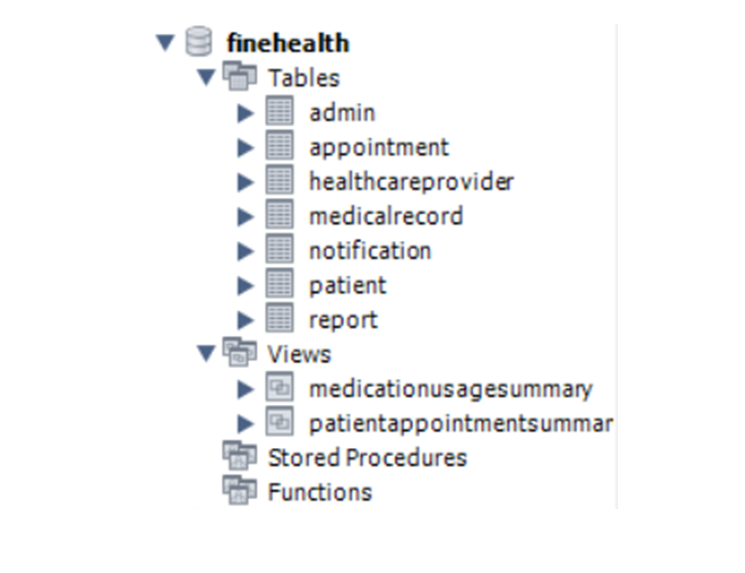
2. Create database and populate data (15 points) Based on your ERD, create the physical database using SQL
DATABASE CREATION
-- =========================
-- Database: FineHealth
-- =========================
CREATE DATABASE FineHealth;
USE FineHealth;
TABLE CREATION
-- =========================
-- Table: Admin
-- Stores admin user details
-- =========================
CREATE TABLE Admin (
admin_id INT PRIMARY KEY,
admin_name VARCHAR (100) NOT NULL,
email VARCHAR (100) NOT NULL UNIQUE
);
INSERT INTO Admin (admin_id, admin_name, email) VALUES
(1, 'John Admin', 'john@finehealth.com'),
(2, 'Lisa Clark', 'lisa@finehealth.com');
-- =========================
-- Table: Patient
-- Stores patient personal and contact details, linked to Admin
-- =========================
CREATE TABLE Patient (
patient_id INT PRIMARY KEY,
patient_name VARCHAR (100) NOT NULL,
email VARCHAR (100) UNIQUE NOT NULL,
phone VARCHAR (20),
address VARCHAR (255),
admin_id INT,
FOREIGN KEY (admin_id) REFERENCES Admin(admin_id));
INSERT INTO Patient (patient_id, patient_name, email, phone, address, admin_id) VALUES
(3, 'Peter Parker', 'peter@finehealth.com', '1234567890', 'Queens, NY', 1),
(4, 'Susan Storm', 'susan@finehealth.com', '2345678901', 'Brooklyn, NY', 1),
(5, 'Tony Stark', 'tony@finehealth.com', '3456789012', 'Manhattan, NY', 1),
(6, 'Bruce Banner', 'bruce@finehealth.com', '4567890123', 'Harlem, NY', 2),
(7, 'Natasha Romanoff', 'natasha@finehealth.com', '5678901234', 'Bronx, NY', 2);
-- =========================
-- Table: HealthcareProvider
-- Stores doctor/nurse details and specialization, linked to Admin
-- =========================
CREATE TABLE HealthcareProvider (
provider_id INT PRIMARY KEY,
healthcare_name VARCHAR (100) NOT NULL,
specialty VARCHAR (100),
availability VARCHAR (100),
admin_id INT,
FOREIGN KEY (admin_id) REFERENCES Admin(admin_id)
);
INSERT INTO HealthcareProvider (provider_id, healthcare_name, specialty, availability, admin_id) VALUES
(8, 'Dr. Smith', 'Cardiology', 'Mon-Fri 9am-5pm', 1),
(9, 'Nurse Anna', 'Pediatrics', 'Tue-Thu 10am-4pm', 1),
(10, 'Dr. Williams', 'Dermatology', 'Wed-Fri 1pm-6pm', 2),
(11, 'Dr. Brown', 'Neurology', 'Mon-Wed 8am-12pm', 2),
(12, 'Nurse Taylor', 'General Medicine', 'Mon-Fri 10am-3pm', 2);
-- =========================
-- Table: Appointment
-- Stores appointment bookings between patients and providers
-- =========================
CREATE TABLE Appointment (
appointment_id INT PRIMARY KEY AUTO_INCREMENT,
patient_id INT NOT NULL,
provider_id INT NOT NULL,
appointment_date DATE NOT NULL,
appointment_time TIME NOT NULL,
appointment_status VARCHAR (50),
FOREIGN KEY (patient_id) REFERENCES Patient(patient_id),
FOREIGN KEY (provider_id) REFERENCES HealthcareProvider(provider_id)
);
INSERT INTO Appointment (patient_id, provider_id, appointment_date, appointment_time, appointment_status) VALUES
(3, 8, '2025-05-10', '10:30:00', 'Scheduled'),
(4, 9, '2025-05-15', '14:00:00', 'Scheduled'),
(5, 10, '2025-05-04', '11:00:00', 'Completed'),
(6, 11, '2025-05-13', '09:00:00', 'Cancelled'),
(7, 12, '2025-05-14', '12:00:00', 'Scheduled');
-- =========================
-- Table: MedicalRecord
-- Records medical history, linked to patient and optionally Provider
-- =========================
CREATE TABLE MedicalRecord (
record_id INT PRIMARY KEY AUTO_INCREMENT,
patient_id INT NOT NULL,
provider_id INT,
diagnosis TEXT,
medication TEXT,
treatment_notes TEXT,
last_updated DATE,
FOREIGN KEY (patient_id) REFERENCES Patient(patient_id),
FOREIGN KEY (provider_id) REFERENCES HealthcareProvider(provider_id)
);
INSERT INTO MedicalRecord (patient_id, provider_id, diagnosis, medication, treatment_notes, last_updated) VALUES
(3, 8, 'Hypertension', 'Lisinopril', 'Regular checkup', '2025-04-01'),
(3, 9, 'Cold', 'Paracetamol', 'Advised rest', '2025-04-25'),
(4, 10, 'Migraine', 'Ibuprofen', 'Monitor symptoms', '2025-05-02'),
(5, 11, 'Anxiety', 'Sertraline', 'Follow-up monthly', '2025-05-03'),
(6, 12, 'Diabetes', 'Metformin', 'Diet + medication', '2025-05-04');
-- =========================
-- Table: Report
-- Generated by Admins for audit or analysis purposes
-- =========================
CREATE TABLE Report (
report_id INT PRIMARY KEY AUTO_INCREMENT,
admin_id INT NOT NULL,
report_type VARCHAR (50),
generated_on DATE,
FOREIGN KEY (admin_id) REFERENCES Admin(admin_id)
);
INSERT INTO Report (admin_id, report_type, generated_on) VALUES
(1, 'System Usage', '2025-05-05'),
(1, 'User Activity', '2025-05-06'),
(2, 'Daily Summary', '2025-05-06'),
(2, 'Error Logs', '2025-05-07'),
(1, 'Security Audit', '2025-05-07');
-- =========================
-- Table: Notification
-- Sent to Patients; can be linked to an appointment or general
-- =========================
CREATE TABLE Notification (
notification_id INT PRIMARY KEY AUTO_INCREMENT,
patient_id INT NOT NULL,
appointment_id INT,
message TEXT NOT NULL,
notification_time DATETIME NOT NULL,
FOREIGN KEY (patient_id) REFERENCES Patient(patient_id),
FOREIGN KEY (appointment_id) REFERENCES Appointment(appointment_id)
);
INSERT INTO Notification (patient_id, appointment_id, message, notification_time) VALUES
(3, 1, 'Your appointment is scheduled for May 10 at 10:30 AM', NOW()),
(4, 2, 'Reminder: appointment on May 15 at 2:00 PM', NOW()),
(3, NULL, 'Your lab results are now available', NOW()),
(5, 3, 'Appointment has been completed', NOW()),
(6, 4, 'Appointment has been cancelled', NOW()),
(7, 5, 'Reminder: appointment on May 14 at 10:00 AM', NOW()),
(4, NULL, 'Your lab results are now available', NOW());
3. Create views for frequently accessed data Provide useful summaries or filtered data. Join relevant two to three tables. Reflect potential real-world use cases (e.g., popular medications, doctor–patient interaction summaries).
View 1: PatientAppointmentSummary
Purpose: To show a summary of patient appointments, including appointment details, patient names, and assigned healthcare providers. Useful for administrative overviews or patient portals.
Joins:
Appointment
Patient
HealthcareProvider
SQL Code:
-- View 1: PatientAppointmentSummary-- =========================
-- Provides joined information on patients and their appointments
-- =========================
DROP VIEW IF EXISTS PatientAppointmentSummary;
CREATE VIEW PatientAppointmentSummary AS
SELECT
a.appointment_id,
a.appointment_date,
a.appointment_time,
a.appointment_status,
p.patient_id,
p.patient_name AS patient_name,
hp.provider_id,
hp.healthcare_name AS provider_name,
hp.specialty
FROM Appointment a
JOIN Patient p ON a.patient_id = p.patient_id
JOIN HealthcareProvider hp ON a.provider_id = hp.provider_id;

View 2: MedicationUsageSummary
Purpose: To display the most prescribed medications along with how many times each was recorded in MedicalRecord. This helps in reporting and trend analysis.
SQL Code:
-- View 2: MedicationUsageSummary-- =========================
-- VIEW: MedicationUsageSummary
-- Provides Medical Usage Summary of Patient
-- =========================
DROP VIEW IF EXISTS MedicationUsageSummary;
CREATE VIEW MedicationUsageSummary AS
SELECT
    medication,
    COUNT(*) AS prescription_count
FROM MedicalRecord
GROUP BY medication
ORDER BY prescription_count DESC;
Real-World Use Cases:
PatientAppointmentSummary: Helps support staff see daily schedules, understand patient-provider distribution, or track upcoming appointments.
MedicationUsageSummary: Assists medical analysts or pharmacists in evaluating which medications are most frequently prescribed across the system.
4. Create report queries for the system (60 points )
Low Complexity Queries (1–4)
Query 1: List all patients living in a specific city
Purpose:This query helps in identifying all patients who reside in Brooklyn, NY. It is useful for conducting targeted outreach, analyzing location-specific trends, or launching city-based healthcare campaigns. Simple filtering based on city. Useful for location-specific patient segmentation.
Expected Output:Returns a list of patients including their ID, name, email, phone number, and full address - filtered specifically to those whose address contains “Brooklyn, NY”.
SELECT patient_id, name, email, phone, address FROM Patient WHERE address LIKE '%Brooklyn, NY%';
Query 2: Total Number of Appointments
Purpose:This query provides a quick summary of how many appointments are stored in the system. It can be used to assess overall platform usage, track growth in appointment bookings over time, or inform resource allocation. Basic summary to track system usage or appointment volume.
Expected Output:Returns a single numeric value representing the total count of appointments recorded in the database.
SELECT COUNT(*) AS total_appointments FROM Appointment;output:

Query 3: Healthcare Providers by Specialty
Purpose:This query organizes all healthcare providers by their specialty, making it easier for staff or patients to search for providers based on medical expertise. It aids in better navigation and assignment of cases to relevant professionals. Easy lookup of providers grouped by medical specialty.
Expected Output:A complete list of providers showing their ID, name, specialty, and availability, sorted in ascending order of specialty.
SELECT provider_id, name, specialty, availability FROM HealthcareProvider ORDER BY specialty ASC;output:

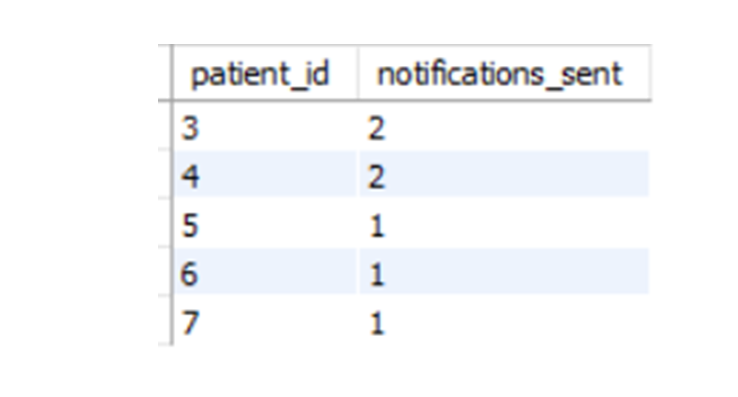
Query 4: Notifications Sent per Patient
Purpose:This query measures how frequently the system communicates with each patient. It helps in evaluating the effectiveness of notification strategies and whether patients are receiving timely alerts and updates. Track communication effectiveness or usage.
Expected Output:Returns the patient ID along with the total number of notifications sent to them, grouped by each patient.
SELECT patient_id, COUNT(*) AS notifications_sent FROM Notification GROUP BY patient_id;output:
Medium Complexity Queries (5–6)
Query 5: Detailed Appointment Schedule
Purpose:This query consolidates appointment data with patient and provider names, giving a complete and readable schedule. It’s ideal for administrative staff who need to view or manage appointments along with the involved parties. A detailed appointment schedule for daily operations or reporting.
Expected Output:Displays each appointment’s ID, date, time, status, and the full names of both the patient and the healthcare provider, ordered by appointment time.
SELECT
    a.appointment_id,
    a.appointment_date,
    a.appointment_time,
    a.appointment_status,
    p.patient_name AS patient_name,
    hp.healthcare_name AS provider_name
FROM Appointment a
JOIN Patient p ON a.patient_id = p.patient_id
JOIN HealthcareProvider hp ON a.provider_id = hp.provider_id
ORDER BY a.appointment_date, a.appointment_time;
output:

Query 6: Active Providers Based on Medical Records
Purpose:This query identifies providers who are heavily involved in patient care documentation. It helps in monitoring provider workload and engagement based on how many medical records they’ve authored. Identify active providers involved in patient documentation.
Expected Output:A list of healthcare providers who have authored more than one medical record, including their name, ID, and the total number of records they created.
SELECT
    hp.provider_id,
    hp.healthcare_name,
    COUNT(mr.record_id) AS records_created
FROM HealthcareProvider hp
JOIN MedicalRecord mr ON hp.provider_id = mr.provider_id
GROUP BY hp.provider_id, hp.healthcare_name
HAVING COUNT(mr.record_id) > 1;
High Complexity Query (7)
Query 7: Top 3 Most Prescribed Medications
Purpose:This query analyzes prescription trends by highlighting the top three most frequently prescribed medications. It also indicates how many unique patients and providers are associated with each, offering insights for procurement, policy decisions, or public health planning. Aggregated insights for pharmaceutical usage, cross-referenced by providers and patients. Could support procurement or health.
Expected Output:A list of the top 3 medications by total prescription count, including the number of distinct patients and providers linked to each medication.
SELECT
    mr.medication,
    COUNT(*) AS total_prescriptions,
    COUNT(DISTINCT mr.patient_id) AS unique_patients,
    COUNT(DISTINCT mr.provider_id) AS unique_providers
FROM MedicalRecord mr
GROUP BY mr.medication
ORDER BY total_prescriptions DESC
LIMIT 3;
output:

REFERENCE
Coronel, C. and Morris, S., 2019. Database Systems: Design, Implementation, & Management. 13th ed. Boston: Cengage Learning.
Rob, P. and Coronel, C., 2007. Database Systems: Design, Implementation, and Management. 8th ed. Boston: Thomson Course Technology.
MySQL, 2024. MySQL 8.0 Reference Manual. [online] Available at: https://dev.mysql.com/doc/ [Accessed 8 May 2025].
Elmasri, R. and Navathe, S.B., 2015. Fundamentals of Database Systems. 7th ed. Boston: Pearson.


This looks like a solid approach to organizing healthcare data, especially with patients, providers, appointments, and medical records all connected in one system. I like that the project focuses on keeping the relationships between the different entities consistent, since that can get complicated pretty quickly as the amount of data grows. The SQL queries for things like appointment counts and identifying providers with multiple records also seem useful for reporting. Keeping the scope limited to the database rather than adding a full front end makes the project feel focused and manageable. spin granny
This is a solid example of how a healthcare database can be structured around clear relationships between patients, providers, appointments, and medical records https://spinmama.pl/bonus/. I especially like that the requirements and assumptions are defined before getting into the database design. The ERD should make those relationships much easier to understand, particularly the links between appointments and both patients and providers. The focus on foreign keys and data consistency is also important for a system dealing with sensitive records.
Really good article. The information is shared in a natural way that keeps readers interested. I found the discussion around instagram reels download useful and easy to follow. Thanks for taking the time to create and share this content.